







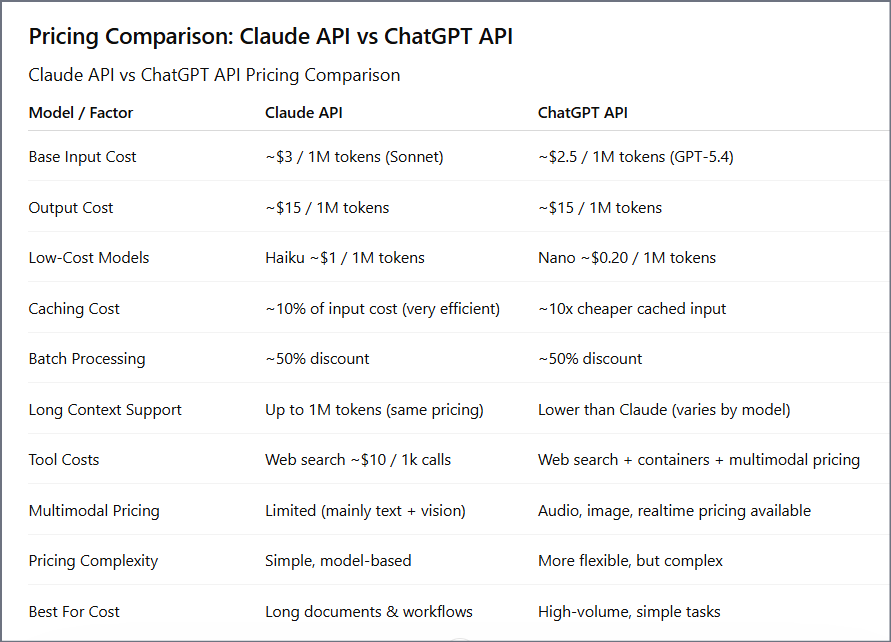
Most comparisons list a pricing table and call it done. This one is written from the trenches — production systems, real invoices, and hard architectural decisions about which API to use and when.
Why This Comparison Actually Matters in 2026
If you’ve searched for “Claude API vs ChatGPT API,” you’ve probably already read five articles that say the same thing — a pricing table, a few bullet points about features, and a vague conclusion like “both are great, choose based on your needs.”
That’s not helpful. And that’s exactly why I wrote this.
My name is Ashish Pandey, and I lead AI development at a technology company where we’ve built production-grade systems using both Anthropic’s Claude API and OpenAI’s ChatGPT API — not just sandbox demos, but real, scalable products: enterprise document automation tools, multi-agent pipelines, customer support systems, and data analysis platforms handling millions of requests per month.
Over the past year, I’ve made real decisions about which API to use, watched real costs hit real invoices, and seen how both APIs behave when systems scale from 1,000 requests per day to over a million.
And I can tell you this with complete confidence: most of what’s written online about this comparison is either outdated, oversimplified, or written by someone who hasn’t actually built anything with these tools.
So instead of giving you another surface-level breakdown, this article covers everything that actually matters when you’re building real systems — pricing behavior at scale, model differences, feature gaps, speed, developer experience, and clear use case guidance.
If you’re building something using Claude API or planning to, feel free to follow me on Linkedin for any queries related to Claude API or AI development.
What’s Changed in 2026 That Makes This Comparison More Important Than Ever
The AI API landscape in 2026 looks nothing like it did even 12 months ago. Four major shifts have made this comparison more critical for any team building with AI:
- Pricing math has fundamentally shifted. New model tiers, prompt caching mechanics, and batch processing discounts mean that what was true about cost in 2024 is no longer accurate. Your budget decisions need to be based on 2026 numbers.
- Context windows have exploded. Claude now supports up to 1 million tokens of context. That’s not a minor update — it fundamentally changes what’s possible with document-heavy and data-intensive applications.
- Agent-based AI is no longer experimental. Both APIs now have mature, production-ready support for tool calling, function execution, and multi-step workflows. But they handle it in very different ways with very different cost implications.
- The multimodal capability gap has widened. ChatGPT API now supports text, images, audio, and video inputs natively. Claude API is primarily text and vision — a meaningful architectural difference for certain product categories.
These shifts make 2026 the most important year yet to properly evaluate which API fits your architecture, your budget, and your specific use case.
Who This Article Is Written For
I’ve written this for three types of readers:
- Developers and Engineers who are evaluating which API to integrate into a product and want an honest, technical breakdown — including code examples, token cost math, and real integration comparisons.
- Product Managers and Founders who need to make a buy-vs-build decision and want to understand which API gives the best foundation for user-facing features, scalability, and cost predictability.
- Technology Leaders like myself who are responsible for AI architecture decisions at a company level — and need to understand not just what these APIs do today, but where they are heading.
My Framework for This Comparison
I’m not going to cherry-pick metrics that make one API look better than the other. Every dimension below reflects a real decision point I’ve faced while building production AI systems:
| Dimension | What This Article Covers |
|---|---|
| Pricing | Token costs, blended per-chat math, caching, batch discounts, hidden fees |
| Model Lineup | What models exist, what tier they occupy, when to use each one |
| Context & Memory | Context window sizes, memory tools, persistence across sessions |
| Reasoning | How each model thinks through complex, multi-step problems |
| Multimodal Capabilities | Image, audio, video — what’s supported and at what cost |
| Tool Use & Agents | Function calling, multi-step workflows, agent architecture patterns |
| Speed & Latency | Real-world response time comparisons across model tiers |
| Developer Experience | SDK quality, documentation, error handling, rate limits |
| Use Cases | Where each API genuinely outperforms for specific product types |
| Hybrid Architecture | How to intelligently combine both APIs in a single production system |
At the end of each section, I’ll give you my honest verdict based on actual production experience — not theory, not benchmarks run in a sandbox.
The Honest Answer Before We Begin
Before we dive into the full comparison, let me give you the headline right upfront — because I believe in giving you the conclusion first and letting the data back it up:
There is no universally “better” API. There is only the right API for your specific use case, budget, and architecture — and in many cases, the smartest answer is using both.
Here’s how the two APIs generally split across use cases:
| API | Tends to Win When… |
|---|---|
| Claude API | Long context processing, structured reasoning, document-heavy workflows, agent pipelines, cost-efficient repeated prompts with caching |
| ChatGPT API | Speed-sensitive applications, multimodal inputs (audio/video), real-time user interaction, ecosystem integrations, high-volume simple tasks |
In many of the most complex systems we’ve built at our company, we use both — routing different tasks to the right model based on what each one does best. By the end of this article, you’ll have a complete framework to do exactly that.
Let’s start where every real product decision starts: pricing.
Table of Contents
- Introduction — Why This Comparison Matters in 2026 (You are here)
- Model Lineup Comparison — Which Models Are Available on Each API?
- Pricing Deep Dive — Token-by-Token Cost Breakdown
- Real Cost Calculator — How Much Does $100 Actually Get You?
- Feature-by-Feature Comparison
- API Developer Experience — SDKs, Docs & Integration
- Use Case Breakdown — What Should You Build With Each?
- Hybrid Architecture — When & How to Use Both APIs Together
- Ashish’s Real-World Verdict — What We Use at Our Company & Why
- Decision Framework — A Simple Guide to Choose the Right API
- FAQs
- Final Thoughts
Model Lineup Comparison — Claude API vs ChatGPT API (2026)
Before we get into pricing math, you need to understand the model landscape. Because the biggest mistake most developers make is comparing the wrong models against each other — like benchmarking a flagship reasoning model against a budget-tier fast model and calling it a “fair comparison.”
Both Anthropic and OpenAI have structured their 2026 model lineups in tiers. Understanding where each model sits — and what trade-off it represents — is the foundation of every cost and performance decision that follows.
Let’s break down each lineup properly.
Claude API Model Lineup (2026)
Anthropic organizes the Claude API around three distinct tiers, each targeting a different cost-performance point. As of 2026, the current recommended production models are Claude Opus 4.6, Claude Sonnet 4.6, and Claude Haiku 4.5.
| Model | Tier | Best For | Context Window | Input (per 1M tokens) | Output (per 1M tokens) |
|---|---|---|---|---|---|
| Claude Opus 4.6 | Flagship | Complex reasoning, coding, agent tasks | 1M tokens | $5.00 | $25.00 |
| Claude Sonnet 4.6 | Balanced | Production workloads, day-to-day AI tasks | 1M tokens | $3.00 | $15.00 |
| Claude Haiku 4.5 | Fast & Cheap | High-volume, simple tasks, pipelines | 200K tokens | $1.00 | $5.00 |
| Claude Opus 4.1 (Legacy) | Legacy | Not recommended — migrate away | 200K tokens | $15.00 | $75.00 |
The most important thing to know about Claude’s 2026 lineup: The jump from the legacy Opus 4.1 ($15/$75) to the current Opus 4.6 ($5/$25) represents a 67% cost reduction — and the newer model is broadly more capable. If your system is still on any Claude 3.x or Opus 4.1 model, migrating is the single highest-impact cost optimization you can make right now.
Claude Opus 4.6 — The Flagship
Opus 4.6 is Anthropic’s most capable model as of 2026. It scores 91.3% on GPQA Diamond (PhD-level reasoning benchmark) — the highest published score for any commercial LLM at the time of its release. It supports the full 1 million token context window at standard pricing, meaning a 900,000-token request costs the same per-token as a 9,000-token request. No penalty for large inputs.
It also includes a Fast Mode (beta) which delivers significantly faster output at 6x standard rates — useful for latency-critical workflows that need Opus-level intelligence.
When to use Opus 4.6: Complex multi-step reasoning, legal document analysis, high-stakes code generation, agentic workflows where reasoning depth directly affects output quality.
Claude Sonnet 4.6 — The Workhorse
Sonnet 4.6 is where most production workloads should live. At $3 input / $15 output per million tokens, it is 5x cheaper than Opus while scoring 79.6% on SWE-bench Verified — strong enough for the vast majority of real-world tasks. It also supports the full 1M token context window.
Notably, Anthropic reports that developers using Claude Code preferred Sonnet 4.6 over the previous flagship Opus 4.5 59% of the time — a strong signal that the quality-to-cost ratio is excellent.
When to use Sonnet 4.6: Content generation, data analysis, research summarization, customer support automation, coding assistance, most document processing tasks.
Claude Haiku 4.5 — The Speed Tier
Haiku 4.5 is the cost-optimized option at $1/$5 per million tokens — making it one of the cheapest production-ready models from any major provider. It has a 200K context window and a 73.3% SWE-bench score. It is not suitable for complex reasoning or long-document analysis, but it is excellent for classification, triage, simple Q&A, and background processing pipelines.
When to use Haiku 4.5: High-volume simple tasks, classification pipelines, real-time simple chat, cost-sensitive automation.
ChatGPT API Model Lineup (2026)
OpenAI’s 2026 API lineup is considerably broader than Claude’s — 15 models across multiple families. The current flagship family is GPT-5.4, released March 2026, which ships in five distinct variants covering a massive price-to-capability range.
| Model | Tier | Best For | Context Window | Input (per 1M tokens) | Output (per 1M tokens) |
|---|---|---|---|---|---|
| GPT-5.4 Pro | Premium | Legal, medical, enterprise-grade tasks | 128K tokens | $30.00 | $180.00 |
| GPT-5.4 (Standard) | Flagship | General high-capability tasks | 128K tokens | $2.50 | $15.00 |
| GPT-5.4 Mini | Balanced | High-volume, latency-sensitive workloads | 400K tokens | $0.40 | $1.60 |
| GPT-5.4 Nano | Cheapest | Edge, embedded, classification tasks | — | $0.05 | $0.40 |
| GPT-4.1 | Long Context | Document analysis requiring 1M+ context | 1M+ tokens | $2.00 | $8.00 |
| o3 (Reasoning) | Reasoning | Math, logic, code analysis, planning | — | $2.00 | $8.00 |
| GPT-4o | Legacy | Not recommended for new projects | 128K tokens | $2.50 | $10.00 |
Key thing to understand about OpenAI’s lineup: The range is enormous. GPT-5.4 Nano at $0.05/million input tokens is 600x cheaper than GPT-5.4 Pro at $30/million. This gives you extreme flexibility — but it also means the model selection decision carries significant financial weight.
GPT-5.4 Standard — The General Flagship
At $2.50/$15 per million tokens, GPT-5.4 Standard is OpenAI’s answer to Claude Sonnet — a broadly capable model for most production tasks. It scores 57.7% on SWE-bench Pro and 75% on OSWorld (computer use benchmark). It is the first mainline OpenAI model to combine frontier coding, computer use, and knowledge work in a single system.
When to use GPT-5.4 Standard: User-facing applications, general assistant features, content generation, multimodal tasks involving images.
GPT-5.4 Mini — The Speed-Cost Sweet Spot
Released March 17, 2026, Mini scores 54.38% on SWE-bench Pro — remarkably close to Standard — at roughly 6x lower cost ($0.40/$1.60). For high-volume, latency-sensitive workloads like chat support and content generation, Mini is the practical choice for OpenAI-based systems.
GPT-4.1 — The Long-Context Option
GPT-4.1 is notable because it supports a 1M+ context window — bringing OpenAI into long-context territory that Claude has dominated. At $2/$8, it is competitively priced for document-heavy use cases. This is a meaningful shift in the competitive landscape compared to 2024.
o3 — The Reasoning Specialist
The o-series models are purpose-built for multi-step reasoning: math, logic, planning, and complex code analysis. If your task genuinely requires deep, structured reasoning chains — not just a complex prompt — o3 is worth evaluating. It operates differently from the GPT-5 family and uses explicit chain-of-thought reasoning before generating a response.
Claude API vs ChatGPT API — Model Lineup: Side-by-Side Comparison
| Factor | Claude API (2026) | ChatGPT API (2026) |
|---|---|---|
| Number of active models | 3 recommended + legacy options | 15+ models across multiple families |
| Flagship model | Claude Opus 4.6 | GPT-5.4 Standard / GPT-5.4 Pro |
| Flagship input price | $5.00 / 1M tokens | $2.50 / 1M tokens (Standard) |
| Flagship output price | $25.00 / 1M tokens | $15.00 / 1M tokens (Standard) |
| Cheapest available model | Haiku 4.5 — $1.00/$5.00 | GPT-5.4 Nano — $0.05/$0.40 |
| Max context window | 1M tokens (Opus 4.6, Sonnet 4.6) | 1M+ tokens (GPT-4.1) |
| Reasoning specialist model | Extended Thinking (built into Opus/Sonnet) | o3 / o3 Mini (separate model family) |
| Model lineup complexity | Simple — 3 tiers, easy to choose | Complex — 15+ models, requires careful selection |
| Multimodal support | Text + Images (all models) | Text + Images + Audio + Video (GPT-5.4) |
| PhD-level reasoning benchmark | 91.3% GPQA Diamond (Opus 4.6) | 83% GDPval (GPT-5.4) |
| Coding benchmark | 79.6% SWE-bench Verified (Sonnet 4.6) | 57.7% SWE-bench Pro (GPT-5.4) |
| Computer use benchmark | 72.7% OSWorld (Sonnet 4.6) | 75% OSWorld (GPT-5.4) |
How to Match the Right Model to Your Use Case
Based on my production experience, here is the model routing logic I actually use when building AI systems in 2026:
| Use Case | Best Claude Model | Best ChatGPT Model | My Recommendation |
|---|---|---|---|
| Large document processing (>200K tokens) | Sonnet 4.6 or Opus 4.6 | GPT-4.1 | Claude Sonnet 4.6 — better structured output at similar price |
| Complex reasoning / PhD-level tasks | Opus 4.6 | o3 or GPT-5.4 Pro | Claude Opus 4.6 — leads on GPQA Diamond benchmark |
| Production coding assistance | Sonnet 4.6 | GPT-5.4 Standard | Tie — both strong; Claude edges ahead on SWE-bench |
| High-volume simple automation | Haiku 4.5 ($1/$5) | GPT-5.4 Nano ($0.05/$0.40) | GPT-5.4 Nano — dramatically cheaper for simple tasks |
| Voice / audio applications | Not natively supported | GPT-5.4 (with audio input) | ChatGPT API — Claude does not support audio |
| Real-time user-facing chat | Sonnet 4.6 (with Fast Mode) | GPT-5.4 Mini | GPT-5.4 Mini — faster and cheaper for interactive UX |
| AI agents & multi-step workflows | Opus 4.6 or Sonnet 4.6 | GPT-5.4 Standard | Claude — stronger structured reasoning for agent chains |
| Cost-optimized background processing | Haiku 4.5 + Batch API | GPT-5.4 Nano + Batch API | GPT-5.4 Nano — 20x cheaper per token at this tier |
Ashish’s Verdict: Model Lineup
Claude wins on simplicity and reasoning depth. ChatGPT wins on range and budget flexibility.
Claude’s three-tier lineup (Haiku / Sonnet / Opus) is clean and easy to reason about. There’s a right answer for most use cases, and you’re unlikely to choose the wrong tier. OpenAI’s 15+ model lineup gives you more cost levers to pull — but it also means more decisions to make, and more ways to accidentally pick the wrong model.
If your workload is reasoning-heavy or document-intensive, Claude’s benchmark numbers are genuinely impressive in 2026. If you need the absolute cheapest possible model for simple high-volume tasks, GPT-5.4 Nano at $0.05/million tokens has no equivalent on the Claude side. And if you need audio or video input, ChatGPT is the only option — Claude simply doesn’t support it yet.
Next: Now that you know which models exist, let’s get into the actual math — a token-by-token pricing breakdown with real cost calculations showing exactly what you’ll pay per chat, per document, and per 1 million requests.
Pricing Deep Dive — Token-by-Token Cost Breakdown (2026)
Pricing is where most comparisons go wrong. They show you a table with numbers per million tokens and call it done. But in reality, what you actually pay depends on five variables that interact with each other: which model you pick, how many tokens you use per request, whether you use caching, whether you batch requests, and what additional tools you enable.
In this section, I’ll break down every pricing layer — with real math — so you know exactly what your bill will look like before you write a single line of code.
How tokens work: Both APIs charge per token. One token is roughly 4 characters of English text. 1,000 tokens ≈ 750 words. A typical 500-word email is about 650 tokens. Both input tokens (what you send) and output tokens (what the model generates) are billed separately — and output tokens are always more expensive.
3.1 Base Token Pricing — Input vs Output
The first thing to understand is that input and output tokens are priced very differently. Across all models from both providers, output tokens cost approximately 5x more than input tokens. This is consistent across the entire Claude lineup and most OpenAI models.
Why does this matter? Because in most production systems — chatbots, assistants, content generators — your output volume is the dominant cost driver, not your input. A system that generates long responses will cost far more than one that generates concise answers, even if the prompts are identical.
Claude API — Base Token Pricing (2026)
| Model | Input (per 1M tokens) | Output (per 1M tokens) | Output:Input Ratio |
|---|---|---|---|
| Claude Opus 4.6 | $5.00 | $25.00 | 5x |
| Claude Sonnet 4.6 | $3.00 | $15.00 | 5x |
| Claude Haiku 4.5 | $1.00 | $5.00 | 5x |
ChatGPT API — Base Token Pricing (2026)
| Model | Input (per 1M tokens) | Output (per 1M tokens) | Output:Input Ratio |
|---|---|---|---|
| GPT-5.4 Pro | $30.00 | $180.00 | 6x |
| GPT-5.4 Standard | $2.50 | $15.00 | 6x |
| GPT-5.4 Mini | $0.40 | $1.60 | 4x |
| GPT-5.4 Nano | $0.05 | $0.40 | 8x |
| GPT-4.1 | $2.00 | $8.00 | 4x |
| o3 (Reasoning) | $2.00 | $8.00 | 4x |
Key observation: At the flagship tier, Claude Opus 4.6 ($5/$25) is actually more expensive than GPT-5.4 Standard ($2.50/$15) on a pure token basis. However, Claude Sonnet 4.6 ($3/$15) and GPT-5.4 Standard ($2.50/$15) are remarkably close — with Sonnet being slightly higher on input but identical on output. The biggest gap is at the budget tier: GPT-5.4 Nano ($0.05/$0.40) is 20x cheaper than Claude Haiku 4.5 ($1.00/$5.00) for simple tasks.
3.2 Blended Cost Per Chat — The Real Number You Need
Raw token prices don’t tell you what a conversation actually costs. For that, you need to apply a realistic blend of input and output tokens based on how people actually use these systems.
A widely used industry benchmark is a 3:1 input-to-output token ratio — meaning for every output token generated, there are roughly 3 input tokens sent. This reflects real conversation patterns where system prompts, conversation history, and user messages typically outweigh the model’s responses in token count.
Using a standard assumption of 15,000 input tokens and 5,000 output tokens per chat session (equivalent to a long, detailed conversation), here is what each model costs per chat:
Claude API — Cost Per Chat Session
| Model | Input Cost (15K tokens) | Output Cost (5K tokens) | Total Per Chat | Chats for $20 | Chats per Day (30 days) |
|---|---|---|---|---|---|
| Claude Opus 4.6 | $0.075 | $0.125 | $0.200 | ~100 chats | ~3 per day |
| Claude Sonnet 4.6 | $0.045 | $0.075 | $0.120 | ~167 chats | ~5–6 per day |
| Claude Haiku 4.5 | $0.015 | $0.025 | $0.040 | ~500 chats | ~16 per day |
ChatGPT API — Cost Per Chat Session
| Model | Input Cost (15K tokens) | Output Cost (5K tokens) | Total Per Chat | Chats for $20 | Chats per Day (30 days) |
|---|---|---|---|---|---|
| GPT-5.4 Standard | $0.0375 | $0.075 | $0.113 | ~177 chats | ~6 per day |
| GPT-5.4 Mini | $0.006 | $0.008 | $0.014 | ~1,428 chats | ~48 per day |
| GPT-5.4 Nano | $0.00075 | $0.002 | $0.00275 | ~7,272 chats | ~242 per day |
| GPT-4.1 | $0.030 | $0.040 | $0.070 | ~285 chats | ~9 per day |
What this math tells you: At the balanced tier (Sonnet 4.6 vs GPT-5.4 Standard), the per-chat cost is almost identical — $0.120 vs $0.113. The real difference emerges at the budget tier: GPT-5.4 Mini gives you 1,428 chats for $20 versus Haiku’s 500 chats. If you’re building a high-volume product where simple responses are acceptable, that difference is enormous at scale.
3.3 Prompt Caching — Where Real Cost Savings Happen
This is the single most underused cost optimization in production AI systems — and it’s where Claude API has a significant structural advantage for certain workload types.
Prompt caching allows you to store frequently used portions of your prompt (system instructions, document context, conversation history) so the API doesn’t reprocess them on every request. Instead of paying full input token rates, cached tokens are read at a fraction of the price.
How Prompt Caching Works (Code Example)
// Claude API — Prompt Caching Example
const response = await anthropic.messages.create({
  model: "claude-sonnet-4-6",
  max_tokens: 1024,
  system: [
    {
      type: "text",
      text: "You are a helpful assistant for our legal team...",
      // This 50,000-token system prompt gets cached
      cache_control: { type: "ephemeral" }
    }
  ],
  messages: [
    {
      role: "user",
      content: "Summarize clause 14 of the uploaded contract."
    }
  ]
});

// On first call: full input price ($3.00/1M for Sonnet 4.6)
// On subsequent calls: cache hit price (~$0.30/1M = 90% savings)
Prompt Caching Pricing Comparison
| Provider & Model | Standard Input Price | Cache Write Price | Cache Hit Price | Savings on Cache Hit |
|---|---|---|---|---|
| Claude Opus 4.6 | $5.00/1M | $6.25/1M | $0.50/1M | 90% savings |
| Claude Sonnet 4.6 | $3.00/1M | $3.75/1M | $0.30/1M | 90% savings |
| Claude Haiku 4.5 | $1.00/1M | $1.25/1M | $0.10/1M | 90% savings |
| GPT-5.4 Standard | $2.50/1M | Standard rate | $1.25/1M | 50% savings |
| GPT-5.4 Mini | $0.40/1M | Standard rate | $0.20/1M | 50% savings |
Claude’s caching advantage is real and significant. Claude gives 90% savings on cached tokens vs OpenAI’s 50%. If your system uses large, repeated system prompts — legal instructions, product documentation, company knowledge bases — the cost difference compounds quickly at scale.
Real-World Caching Scenario
Let’s say your AI system has a 50,000-token system prompt (about 37,000 words of product documentation) that is included in every API call. You make 10,000 requests per month.
| Scenario | Claude Sonnet 4.6 | GPT-5.4 Standard |
|---|---|---|
| Without caching (10K requests × 50K tokens) | $1,500/month | $1,250/month |
| With caching (cache hits at 90% / 50%) | $150/month | $625/month |
| Monthly savings | $1,350 saved | $625 saved |
Claude’s 90% cache discount delivers more than double the savings of OpenAI’s 50% discount on the same workload. For systems with large, repeated context — which describes most enterprise AI applications — this difference is substantial.
3.4 Batch Processing — 50% Off for Non-Real-Time Workloads
Both APIs offer batch processing at approximately 50% off standard rates. If your workload doesn’t require real-time responses — nightly data processing, bulk document analysis, background automation — batch is essentially free money.
// Claude API — Batch Processing Example
import Anthropic from "@anthropic-ai/sdk";

const anthropic = new Anthropic();

// Submit a batch of 1,000 requests at 50% cost
const batch = await anthropic.messages.batches.create({
  requests: [
    {
      custom_id: "doc-analysis-001",
      params: {
        model: "claude-sonnet-4-6",
        max_tokens: 1024,
        messages: [
          {
            role: "user",
            content: "Analyze this legal document for risk clauses: ..."
          }
        ]
      }
    }
    // ... 999 more requests
  ]
});

// Results available within 24 hours
// Cost: 50% of standard rate = $1.50/1M input, $7.50/1M output (Sonnet 4.6)
Batch Processing Pricing
| Model | Standard Input | Batch Input (50% off) | Standard Output | Batch Output (50% off) |
|---|---|---|---|---|
| Claude Opus 4.6 | $5.00/1M | $2.50/1M | $25.00/1M | $12.50/1M |
| Claude Sonnet 4.6 | $3.00/1M | $1.50/1M | $15.00/1M | $7.50/1M |
| Claude Haiku 4.5 | $1.00/1M | $0.50/1M | $5.00/1M | $2.50/1M |
| GPT-5.4 Standard | $2.50/1M | $1.25/1M | $15.00/1M | $7.50/1M |
| GPT-5.4 Mini | $0.40/1M | $0.20/1M | $1.60/1M | $0.80/1M |
Combining caching + batch on Claude can reduce effective costs by up to 95% compared to standard real-time pricing. For a content agency or data processing pipeline, this is the difference between a $5,000/month bill and a $250/month bill for identical output volume.
3.5 Long Context Pricing — What Changes Above 200K Tokens
Both APIs offer large context windows, but they handle pricing above certain thresholds differently. This is critical for anyone building document-heavy applications.
| Model | Context Window | Standard Pricing (≤200K tokens) | Long Context Pricing (>200K tokens) |
|---|---|---|---|
| Claude Opus 4.6 | 1M tokens | $5.00/$25.00 per 1M | Same rate — no premium |
| Claude Sonnet 4.6 | 1M tokens | $3.00/$15.00 per 1M | ~$6.00/$22.50 per 1M (above 200K) |
| GPT-4.1 | 1M+ tokens | $2.00/$8.00 per 1M | Varies — check OpenAI docs |
| GPT-5.4 Standard | 128K tokens | $2.50/$15.00 per 1M | Not applicable |
Important nuance: Claude Opus 4.6 is the standout here — it offers the full 1 million token context window at a flat rate with no long-context premium. If you regularly process documents exceeding 200,000 tokens, Opus 4.6 is often the most cost-predictable option despite its higher base rate. Sonnet 4.6 doubles in input cost above 200K tokens, which changes the math for very large document workflows.
3.6 Hidden Costs — What Doesn’t Show Up in the Pricing Table
This is where most billing surprises come from. Both APIs charge for more than just tokens once you start using built-in tools and server-side features.
Claude API — Additional Charges
| Feature | Cost | Notes |
|---|---|---|
| Web search (server-side tool) | ~$10 per 1,000 searches | $0.01 per search query |
| Tool use (function calling) | Token overhead (model-dependent) | Additional system prompt tokens added automatically |
| Extended thinking tokens | Billed as standard output tokens | Reasoning tokens counted at output rate — budget carefully |
| Fast Mode (Opus 4.6) | 6x standard token rates | Only use when latency is critical |
| US-only inference (data residency) | 1.1x multiplier on all tokens | Applies to Opus 4.6 and newer only |
ChatGPT API — Additional Charges
| Feature | Cost | Notes |
|---|---|---|
| Web search (tool calls) | Billed per 1,000 calls + search content tokens | Search content tokens billed at input rate |
| Image generation (GPT Image) | ~$0.01–$0.17 per image | Depends on quality: low / medium / high |
| Audio input/output tokens | Separate pricing tier | Different rate from text tokens |
| Code execution containers | Charged per hour of compute | 50 free hours/day, then per-GB billing |
| File search (Responses API) | Per tool call pricing | Additional charge on top of token costs |
| Regional processing (data residency) | 10% uplift on token pricing | Applies to GPT-5.4 family |
My honest take on hidden costs: Claude has a simpler, more predictable additional cost structure. The main extra charges are web search ($0.01/search) and extended thinking tokens (billed as output). ChatGPT’s additional cost surface is significantly broader — audio, video, image generation, containers, file search — which gives you more capability but makes budgeting more complex. For enterprise finance teams trying to forecast AI spend, Claude is easier to model.
3.7 Complete Pricing Comparison — Claude API vs ChatGPT API (2026)
| Pricing Dimension | Claude API | ChatGPT API | Winner |
|---|---|---|---|
| Flagship input price | $5.00/1M (Opus 4.6) | $2.50/1M (GPT-5.4) | ChatGPT |
| Flagship output price | $25.00/1M (Opus 4.6) | $15.00/1M (GPT-5.4) | ChatGPT |
| Balanced tier input | $3.00/1M (Sonnet 4.6) | $2.50/1M (GPT-5.4) | Near tie |
| Cheapest available model | $1.00/$5.00 (Haiku 4.5) | $0.05/$0.40 (Nano) | ChatGPT |
| Prompt caching savings | 90% off (cache hits) | 50% off (cache hits) | Claude |
| Batch processing savings | 50% off | 50% off | Tie |
| Long context pricing (1M tokens) | Flat rate (Opus 4.6) | Tiered (GPT-4.1) | Claude |
| Pricing structure complexity | Simple — 3 tiers + clear modifiers | Complex — 15 models + many add-ons | Claude |
| Maximum combined savings (cache + batch) | Up to 95% | Up to 75% | Claude |
Ashish’s Verdict: Pricing
ChatGPT is cheaper at the surface. Claude is cheaper at scale — if you use caching and long context correctly.
On raw token prices, ChatGPT wins at both the flagship tier and especially at the budget tier. GPT-5.4 Nano is extraordinarily cheap for simple tasks. But the moment you start building systems with large system prompts, repeated context, or long document inputs, Claude’s 90% cache discount and flat long-context pricing change the math significantly.
In our company’s production systems, we’ve consistently found that Sonnet 4.6 with prompt caching ends up costing less per month than the equivalent GPT-5.4 Standard workload — despite Sonnet’s slightly higher base rate. The 90% vs 50% caching difference is the key driver.
My recommendation: calculate your blended effective rate based on your specific prompt structure before making a final pricing decision. Don’t compare sticker prices. Compare what you’ll actually pay given your token usage patterns.
Next: Now let’s put this pricing into a real-world calculator — exactly what does $100 get you on each API, broken down by model and workload type.
Real Cost Calculator — What Does $100 Actually Get You?
Pricing tables are useful, but what most developers actually want to know is simple: “If I budget $100/month for AI API costs, how far does that go?”
The answer depends entirely on your workload type. So instead of giving you one number, I’ve broken this down across four real-world workload types that cover the majority of production AI use cases I’ve worked with.
Methodology: All calculations use a 3:1 input-to-output token blend. Workload-specific token counts are based on typical production usage patterns from systems I’ve built or audited. Caching savings assume 80% cache hit rate on system prompts where applicable.
Workload 1: Customer Support Chatbot
Assumption: Each conversation averages 8,000 input tokens (including system prompt + history) and 2,000 output tokens. System prompt is 3,000 tokens, cached across 80% of requests.
| Model | Effective Cost Per Chat | Chats for $100 | Daily Volume (30 days) |
|---|---|---|---|
| Claude Opus 4.6 | $0.092 | ~1,087 chats | ~36/day |
| Claude Sonnet 4.6 | $0.046 | ~2,174 chats | ~72/day |
| Claude Haiku 4.5 | $0.016 | ~6,250 chats | ~208/day |
| GPT-5.4 Standard | $0.056 | ~1,786 chats | ~59/day |
| GPT-5.4 Mini | $0.007 | ~14,286 chats | ~476/day |
| GPT-5.4 Nano | $0.0014 | ~71,429 chats | ~2,381/day |
Takeaway: For a customer support chatbot where responses don’t require deep reasoning, GPT-5.4 Mini is the clear cost winner at enterprise scale. Claude Sonnet 4.6 with caching is a strong choice if your support conversations are complex and require structured, nuanced responses.
Workload 2: Long Document Analysis (Legal / Research / Finance)
Assumption: Each request processes a 150,000-token document plus a 2,000-token instruction prompt, generating a 3,000-token structured report. No caching (each document is unique).
| Model | Cost Per Document | Documents for $100 | Notes |
|---|---|---|---|
| Claude Opus 4.6 | $0.836 | ~120 documents | Flat rate — no long-context premium |
| Claude Sonnet 4.6 | $0.951 | ~105 documents | Long-context rate kicks in above 200K tokens |
| Claude Haiku 4.5 | Not applicable | — | 200K context limit — not suitable for this workload |
| GPT-4.1 | $0.324 | ~309 documents | 1M+ context at $2/$8 — very competitive here |
| GPT-5.4 Standard | Not applicable | — | 128K context limit — cannot handle this workload |
Takeaway: This is where GPT-4.1 surprises. At $2/$8 with 1M+ context, it processes large documents cheaper than Claude Opus 4.6 ($5/$25). However, from my experience, Claude Opus 4.6 produces more structurally coherent analysis on complex legal and financial documents — so the quality-to-cost equation depends on your quality requirements. For research-grade output, Claude Opus 4.6 is worth the premium. For bulk extraction and summarization where volume matters, GPT-4.1 is more economical.
Workload 3: AI Agent Pipeline (Multi-Step Automation)
Assumption: Each agent run involves 5 sequential API calls averaging 4,000 input tokens and 1,500 output tokens each. System prompt cached across all calls. No batch processing (real-time execution required).
| Model | Cost Per Agent Run (5 calls) | Agent Runs for $100 | Daily Runs (30 days) |
|---|---|---|---|
| Claude Opus 4.6 | $0.288 | ~347 runs | ~11/day |
| Claude Sonnet 4.6 | $0.173 | ~578 runs | ~19/day |
| Claude Haiku 4.5 | $0.058 | ~1,724 runs | ~57/day |
| GPT-5.4 Standard | $0.163 | ~613 runs | ~20/day |
| GPT-5.4 Mini | $0.020 | ~5,000 runs | ~167/day |
Takeaway: For agent pipelines where reasoning quality determines output value, Claude Sonnet 4.6 and GPT-5.4 Standard are almost identical in cost per run ($0.173 vs $0.163). The real choice here is qualitative — which model executes the reasoning chain more reliably for your specific task. In my production agent systems, Claude Sonnet 4.6 has been more consistent at maintaining context across sequential steps, which reduces re-runs due to errors.
Workload 4: Bulk Content Generation (SEO / Marketing / Reports)
Assumption: Each piece of content requires 1,500 input tokens (brief + instructions) and 3,000 output tokens (the generated content). Using Batch API for 50% discount. System prompt cached.
| Model | Cost Per Content Piece (Batch) | Content Pieces for $100 | Monthly Volume |
|---|---|---|---|
| Claude Sonnet 4.6 + Batch | $0.034 | ~2,941 pieces | ~2,941/month |
| Claude Haiku 4.5 + Batch | $0.008 | ~12,500 pieces | ~12,500/month |
| GPT-5.4 Standard + Batch | $0.028 | ~3,571 pieces | ~3,571/month |
| GPT-5.4 Mini + Batch | $0.004 | ~25,000 pieces | ~25,000/month |
| GPT-5.4 Nano + Batch | $0.00065 | ~153,846 pieces | ~153,846/month |
Takeaway: For bulk content generation, OpenAI’s budget tiers win on pure economics. GPT-5.4 Nano + Batch can produce 153,000 content pieces per month for $100 — though the quality of Nano-generated content is significantly lower than Sonnet or GPT-5.4 Standard. For SEO content where quality matters, Claude Sonnet 4.6 with batch pricing produces strong, well-structured output at a very reasonable $0.034 per piece.
$100 Budget Summary — What You Get Across Workloads
| Workload Type | Best Claude Option | Volume for $100 | Best ChatGPT Option | Volume for $100 |
|---|---|---|---|---|
| Customer Support Chatbot | Haiku 4.5 | 6,250 chats | GPT-5.4 Mini | 14,286 chats |
| Long Document Analysis | Opus 4.6 | 120 documents | GPT-4.1 | 309 documents |
| AI Agent Pipeline | Sonnet 4.6 | 578 runs | GPT-5.4 Standard | 613 runs |
| Bulk Content Generation | Sonnet 4.6 + Batch | 2,941 pieces | GPT-5.4 Mini + Batch | 25,000 pieces |
Ashish’s $100 verdict: ChatGPT gives you more volume per dollar on almost every workload — especially at the budget tier. But “more volume” is only valuable if the quality threshold is met. In agent pipelines and complex document reasoning, the quality difference means Claude’s slightly higher cost often results in lower overall cost per successful task completion because fewer retries and corrections are needed. Always test both on your specific task before making a final budget decision.
Section 5: Feature-by-Feature Comparison — Claude API vs ChatGPT API (2026)
Pricing matters, but features determine what you can actually build. In this section I’ll go through every major technical capability side by side — not just listing what exists, but explaining how each feature behaves in practice and where the real differences show up when you’re building production systems.
5.1 Context Window — Size, Consistency & Behavior
The context window is the amount of text a model can “see” at once — including your system prompt, conversation history, documents, and instructions. Larger context windows mean less chunking, less retrieval engineering, and simpler architectures.
| Capability | Claude API | ChatGPT API |
|---|---|---|
| Maximum context window | 1,000,000 tokens (Opus 4.6, Sonnet 4.6) | 1,000,000+ tokens (GPT-4.1) |
| Flagship model context | 1M tokens (Opus 4.6) | 128K tokens (GPT-5.4 Standard) |
| Budget model context | 200K tokens (Haiku 4.5) | 400K tokens (GPT-5.4 Mini) |
| Consistent pricing across context | Yes — Opus 4.6 flat rate at any size | Tiered — rates change above certain thresholds |
| Context coherence at 500K+ tokens | Strong — maintains structured reasoning | Variable — depends on model and prompt structure |
Real-world note: Having a 1M token context window and actually using it effectively are two different things. From my testing, Claude Opus 4.6 maintains significantly better coherence at the 500K–900K token range than most alternative models. It doesn’t “forget” earlier parts of long documents the way some models do. This matters enormously for legal analysis, financial audits, and research synthesis where early context informs later conclusions.
// Claude API — Processing a 500-page document in one call
const response = await anthropic.messages.create({
  model: "claude-opus-4-6",
  max_tokens: 4096,
  messages: [
    {
      role: "user",
      content: [
        {
          type: "text",
          // Entire 400,000-token document passed directly
          text: fullDocumentText + "\n\nIdentify all risk clauses and cross-references between sections."
        }
      ]
    }
  ]
});
// No chunking. No retrieval pipeline. Single API call.
5.2 Reasoning & Thinking Modes
Both APIs now offer explicit reasoning capabilities — the ability for the model to “think through” a problem before generating a final answer. But they implement this very differently.
| Capability | Claude API | ChatGPT API |
|---|---|---|
| Reasoning feature name | Extended Thinking | Chain-of-Thought (o3 / o-series models) |
| Available on | Opus 4.6, Sonnet 4.6, Haiku 4.5 | o3, o3-mini (separate model family) |
| How it works | Model reasons internally before final response — thinking tokens visible | Separate o-series model with built-in CoT reasoning |
| Thinking token cost | Billed as standard output tokens | Included in o-series model pricing |
| Developer control over depth | Yes — set thinking token budget (min 1,024) | Partial — model-level selection (mini vs standard) |
| PhD-level reasoning benchmark | 91.3% GPQA Diamond (Opus 4.6) | ~83% GDPval (GPT-5.4) |
| Best for | Complex multi-step tasks within a single model | Math, logic, structured planning via dedicated o3 |
Key architectural difference: Claude’s Extended Thinking is built directly into the same Sonnet and Opus models you already use. You toggle it on with a parameter and set a token budget. OpenAI’s advanced reasoning lives in a completely separate model family (o3), meaning you need to manage two different models if you want both general capability and deep reasoning in the same system.
// Claude API — Extended Thinking Example
const response = await anthropic.messages.create({
  model: "claude-sonnet-4-6",
  max_tokens: 16000,
  thinking: {
    type: "enabled",
    budget_tokens: 10000  // Model can use up to 10K tokens to reason
  },
  messages: [
    {
      role: "user",
      content: "Analyze the causal factors in this financial model and identify the three most likely failure points under a 2008-style credit contraction scenario."
    }
  ]
});

// response.content includes both thinking blocks and final answer
// Thinking tokens billed at standard output rate ($15/1M for Sonnet 4.6)
5.3 Multimodal Capabilities — Text, Images, Audio & Video
This is one of the clearest feature gaps between the two APIs in 2026. If your product involves anything beyond text and images, this section is critical.
| Input / Output Type | Claude API | ChatGPT API |
|---|---|---|
| Text input | ✅ All models | ✅ All models |
| Image input (vision) | ✅ All models | ✅ GPT-5.4, GPT-4o, GPT-4.1 |
| PDF / document input | ✅ Native document understanding | ✅ Via file upload |
| Audio input | ❌ Not supported | ✅ GPT-5.4 (audio tokens) |
| Audio output | ❌ Not supported | ✅ GPT-5.4 real-time audio |
| Video input | ❌ Not supported | ✅ GPT-5.4 |
| Image generation | ❌ Not supported via API | ✅ GPT Image / DALL·E ($0.01–$0.17/image) |
| Real-time voice interaction | ❌ Not supported | ✅ GPT-5.4 Realtime API |
| Computer use / screen control | ✅ 72.7% OSWorld | ✅ 75% OSWorld (GPT-5.4) |
This gap is real and significant. If you’re building voice assistants, audio transcription pipelines, video analysis tools, or image generation features, Claude API simply cannot support these use cases today. ChatGPT API is the only option. This is not a minor difference — it determines whether Claude is architecturally viable for your product at all.
For text and vision-only applications (which is still the majority of enterprise AI use cases), both APIs are comparable. Claude’s document understanding is particularly strong for structured PDFs and complex formatted documents.
5.4 Tool Use & Agent Capabilities
Tool use (also called function calling) is the mechanism by which AI models interact with external systems — calling APIs, querying databases, executing code, or triggering workflows. It’s the foundation of every agent-based AI application.
| Capability | Claude API | ChatGPT API |
|---|---|---|
| Function / tool calling | ✅ All models | ✅ All models |
| Parallel tool calls | ✅ Supported | ✅ Supported |
| Tool chaining (sequential) | ✅ Native agentic support | ✅ Supported |
| Web search (built-in) | ✅ Server-side tool (~$0.01/search) | ✅ Built-in tool (per-call + content tokens) |
| Code execution | ✅ Via tool use | ✅ Container-based execution (compute charges) |
| Computer use (GUI automation) | ✅ Native computer use API | ✅ GPT-5.4 computer use |
| MCP (Model Context Protocol) | ✅ Native support — 6,000+ app integrations | ❌ Not supported natively |
| External integrations (Slack, Drive, GitHub) | ✅ Via MCP connectors | ✅ Via OpenAI plugins and custom tools |
| Multi-agent orchestration | ✅ Agent Teams (Opus 4.6) | ✅ Assistants API with handoffs |
| Memory across sessions | ✅ Memory tools (structured) | ✅ Built-in persistent memory (ChatGPT products) |
The MCP advantage for Claude: Anthropic’s Model Context Protocol (MCP) is a standardized open protocol that connects Claude to over 6,000 third-party applications — GitHub, Slack, Jira, Google Drive, Stripe, and thousands more — without custom integration work. This is a meaningful developer experience advantage. Instead of building custom tool handlers for each external service, you connect a pre-built MCP server and it works.
// Claude API — Tool Use with Function Calling
const tools = [
  {
    name: "get_customer_data",
    description: "Retrieves customer record from CRM by customer ID",
    input_schema: {
      type: "object",
      properties: {
        customer_id: {
          type: "string",
          description: "The unique customer identifier"
        },
        fields: {
          type: "array",
          items: { type: "string" },
          description: "Fields to retrieve: name, email, orders, status"
        }
      },
      required: ["customer_id"]
    }
  }
];

const response = await anthropic.messages.create({
  model: "claude-sonnet-4-6",
  max_tokens: 2048,
  tools: tools,
  messages: [
    {
      role: "user",
      content: "Look up customer ID C-8821 and summarize their order history."
    }
  ]
});

// Claude automatically decides when and how to call the tool
// Returns structured tool_use block with arguments
5.5 Speed & Latency — What You Actually Experience
Speed matters more than most developers expect — especially in user-facing applications where perceived responsiveness directly affects retention and satisfaction.
| Metric | Claude API | ChatGPT API |
|---|---|---|
| Flagship model speed | Moderate — Opus 4.6 is thorough, not fast | Fast — GPT-5.4 Standard is noticeably snappier |
| Balanced tier speed | Good — Sonnet 4.6 is production-ready | Good — GPT-5.4 Standard comparable |
| Budget tier speed | Fast — Haiku 4.5 is low-latency | Very fast — GPT-5.4 Mini / Nano extremely quick |
| Fast mode option | ✅ Opus 4.6 Fast Mode (6x cost premium) | Not a separate mode — speed built into model tiers |
| Streaming support | ✅ All models | ✅ All models |
| Real-time voice latency | ❌ Not supported | ✅ GPT-5.4 Realtime API — sub-300ms |
| Best for latency-critical apps | Haiku 4.5 or Sonnet 4.6 | GPT-5.4 Mini or Nano |
Practical impact: In interactive applications — chatbots, AI assistants, code completion tools — users perceive delays above 1–2 seconds negatively. Both Sonnet 4.6 and GPT-5.4 Standard are fast enough for most real-time use cases when streaming is enabled. The gap becomes more noticeable at the flagship tier: Opus 4.6 is slower than GPT-5.4 Standard, though Claude’s Fast Mode (at 6x cost) can close that gap when needed.
5.6 Safety, Reliability & Output Consistency
| Dimension | Claude API | ChatGPT API |
|---|---|---|
| Safety architecture | Constitutional AI — principle-based training | RLHF — human feedback-based training |
| Output consistency | High — structured, predictable responses | High — very adaptable, slightly more variable |
| Refusal behavior | Conservative — may decline edge-case content | Balanced — generally more permissive |
| Hallucination rate | Low — particularly on long-context tasks | Low — strong on factual tasks |
| Instruction following | Excellent — very precise on structured prompts | Excellent — strong across diverse instruction types |
| JSON / structured output | ✅ Strong — reliable schema adherence | ✅ Strong — JSON mode and structured outputs |
| Enterprise compliance | SOC 2 Type II, HIPAA, GDPR | SOC 2 Type II, HIPAA, GDPR |
In production: Claude’s Constitutional AI training makes it noticeably more consistent in following complex, multi-part instructions — particularly in agentic workflows where precise adherence to a system prompt across dozens of sequential calls determines output quality. ChatGPT is more conversationally flexible, which is an advantage for user-facing products but can introduce variability in structured automation workflows.
Complete Feature Comparison — Claude API vs ChatGPT API (2026)
| Feature | Claude API | ChatGPT API | Edge |
|---|---|---|---|
| Max context window | 1M tokens (Opus 4.6) | 1M+ tokens (GPT-4.1) | Tie |
| Flagship context window | 1M tokens | 128K tokens (GPT-5.4) | Claude |
| Extended reasoning | Built-in (Extended Thinking) | Separate model (o3) | Claude (simpler) |
| PhD-level reasoning score | 91.3% GPQA Diamond | ~83% GDPval | Claude |
| Coding benchmark | 79.6% SWE-bench Verified | 57.7% SWE-bench Pro | Claude |
| Audio support | ❌ No | ✅ Yes | ChatGPT |
| Video support | ❌ No | ✅ Yes | ChatGPT |
| Image generation | ❌ No | ✅ Yes (DALL·E / GPT Image) | ChatGPT |
| Real-time voice API | ❌ No | ✅ Yes | ChatGPT |
| MCP integration protocol | ✅ Native (6,000+ apps) | ❌ No native MCP | Claude |
| Prompt caching savings | 90% off cache hits | 50% off cache hits | Claude |
| Batch processing discount | 50% off | 50% off | Tie |
| Computer use | ✅ 72.7% OSWorld | ✅ 75% OSWorld | Near tie |
| Speed (flagship tier) | Moderate | Fast | ChatGPT |
| Speed (budget tier) | Fast | Very fast | ChatGPT |
| Structured output reliability | Excellent | Excellent | Tie |
| Instruction following consistency | Excellent (esp. long prompts) | Excellent | Slight Claude edge |
| Pricing simplicity | Simple (3 tiers) | Complex (15+ models) | Claude |
| Ecosystem breadth | API + MCP focused | Full platform (plugins, apps, enterprise) | ChatGPT |
Ashish’s Verdict: Features
Claude wins on reasoning, context, and structural reliability. ChatGPT wins on multimodal breadth and ecosystem reach.
If I summarize everything in this section into a single decision rule, it’s this: ask whether your product needs audio, video, or image generation. If yes, ChatGPT is the only viable option — Claude cannot support those modalities today. If your product is text and vision only, the feature comparison is much more competitive, and Claude’s advantages in reasoning depth, context handling, and caching make it the stronger technical choice for complex applications.
The MCP ecosystem is a genuine differentiator that most developers underestimate. Being able to connect Claude to GitHub, Slack, Jira, and thousands of other tools without writing custom integrations is a meaningful time and cost saving in production development.
Next up: We move from features into real-world application — Section 6: API Developer Experience covering SDKs, documentation quality, error handling, and what it actually feels like to build with both APIs day-to-day.
API Developer Experience — SDKs, Docs, Integration & Daily Reality
Pricing and features tell you what an API costs and what it can do. Developer experience tells you how much friction you’ll face while actually building with it. And in my experience leading AI development teams, friction compounds. A slightly clunky SDK or inconsistent error behavior adds hours of debugging time every sprint — time that quietly kills product velocity.
Here is an honest breakdown of what it’s actually like to build with both APIs day-to-day in 2026.
6.1 SDK Quality & Language Support
Both Anthropic and OpenAI offer official SDKs for the most common languages. The quality, completeness, and maintenance cadence of these SDKs directly impacts how quickly your team can move.
| Dimension | Claude API (Anthropic SDK) | ChatGPT API (OpenAI SDK) |
|---|---|---|
| Python SDK | ✅ Official — anthropic package | ✅ Official — openai package |
| Node.js / TypeScript SDK | ✅ Official — @anthropic-ai/sdk | ✅ Official — openai npm package |
| Other languages | Community SDKs (Go, Ruby, Java, Rust) | Official + community (Go, Java, .NET, Ruby) |
| TypeScript types | ✅ Fully typed — excellent autocomplete | ✅ Fully typed — excellent autocomplete |
| Streaming support | ✅ Native streaming with helper methods | ✅ Native streaming with helper methods |
| SDK update frequency | Active — frequent releases | Very active — OpenAI ships fast |
| Community size | Growing rapidly | Much larger — years of ecosystem momentum |
| Third-party framework support | LangChain, LlamaIndex, CrewAI, AutoGen | LangChain, LlamaIndex, CrewAI, AutoGen + many more |
Claude API — Python SDK Setup
# Install the Anthropic SDK
pip install anthropic

# Basic usage — Python
import anthropic

client = anthropic.Anthropic(api_key="your-api-key")

message = client.messages.create(
    model="claude-sonnet-4-6",
    max_tokens=1024,
    messages=[
        {
            "role": "user",
            "content": "Explain the difference between RAG and fine-tuning."
        }
    ]
)

print(message.content[0].text)
ChatGPT API — Python SDK Setup
# Install the OpenAI SDK
pip install openai

# Basic usage — Python
from openai import OpenAI

client = OpenAI(api_key="your-api-key")

response = client.chat.completions.create(
    model="gpt-5.4",  # or "gpt-5.4-mini", "gpt-5.4-nano"
    messages=[
        {
            "role": "user",
            "content": "Explain the difference between RAG and fine-tuning."
        }
    ]
)

print(response.choices[0].message.content)
Verdict on SDK quality: Both SDKs are well-designed and production-ready. The OpenAI SDK has a larger ecosystem simply because it has been around longer and has had more third-party integrations built on top of it. The Anthropic SDK is clean, well-typed, and developer-friendly — but you will find fewer ready-made examples and community tutorials compared to OpenAI.
6.2 Streaming — Real-Time Response Delivery
For any user-facing application, streaming is not optional — it’s the difference between a UI that feels responsive and one that feels broken. Both APIs support streaming, but the implementation patterns differ slightly.
Claude API — Streaming Example
# Claude API — Streaming with Python SDK
import anthropic

client = anthropic.Anthropic()

# Stream tokens as they are generated
with client.messages.stream(
    model="claude-sonnet-4-6",
    max_tokens=1024,
    messages=[
        {
            "role": "user",
            "content": "Write a detailed analysis of transformer architecture."
        }
    ]
) as stream:
    for text in stream.text_stream:
        print(text, end="", flush=True)

# Access final message after streaming completes
final_message = stream.get_final_message()
print(f"\nInput tokens: {final_message.usage.input_tokens}")
print(f"Output tokens: {final_message.usage.output_tokens}")
ChatGPT API — Streaming Example
# ChatGPT API — Streaming with OpenAI Python SDK
from openai import OpenAI

client = OpenAI()

# Stream tokens as they are generated
stream = client.chat.completions.create(
    model="gpt-5.4",
    messages=[
        {
            "role": "user",
            "content": "Write a detailed analysis of transformer architecture."
        }
    ],
    stream=True
)

for chunk in stream:
    if chunk.choices[0].delta.content is not None:
        print(chunk.choices[0].delta.content, end="", flush=True)
Practical note: Both streaming implementations are solid in production. One advantage of the Claude SDK is that the stream.get_final_message() method gives you clean access to usage statistics and the complete response after streaming — without needing to reconstruct it manually from chunks. This is a small but meaningful quality-of-life improvement when you need to log token usage alongside streamed responses.
6.3 Error Handling & Rate Limits
In production systems, error handling is as important as the happy path. How an API communicates failures — and how predictable those failures are — directly impacts system reliability.
| Error Type | Claude API Behavior | ChatGPT API Behavior |
|---|---|---|
| Rate limit errors | 429 with retry-after header — clear and predictable | 429 with retry-after header — clear and predictable |
| Context length exceeded | 400 error with token count details | 400 error with clear message |
| Content policy violation | Returns refusal in response body — not an error | Returns refusal or 400 depending on severity |
| Server errors (5xx) | Infrequent — good uptime track record | Infrequent — strong infrastructure reliability |
| Timeout behavior | Configurable — SDK handles retries | Configurable — SDK handles retries |
| Rate limit structure | Requests per minute + tokens per minute | Requests per minute + tokens per minute + tier-based |
Robust Error Handling — Claude API
import anthropic
import time

client = anthropic.Anthropic()

def call_claude_with_retry(prompt, max_retries=3):
    """Production-ready Claude API call with retry logic"""
    for attempt in range(max_retries):
        try:
            response = client.messages.create(
                model="claude-sonnet-4-6",
                max_tokens=1024,
                messages=[{"role": "user", "content": prompt}]
            )
            return response.content[0].text

        except anthropic.RateLimitError as e:
            wait_time = 2 ** attempt  # Exponential backoff
            print(f"Rate limit hit. Waiting {wait_time}s... (attempt {attempt + 1})")
            time.sleep(wait_time)

        except anthropic.APIStatusError as e:
            if e.status_code == 529:  # Overloaded
                time.sleep(5)
            else:
                raise  # Re-raise unexpected errors

        except anthropic.APIConnectionError:
            print("Connection error — retrying...")
            time.sleep(2)

    raise Exception("Max retries exceeded")
6.4 Documentation Quality & Learning Resources
| Resource Type | Claude API (Anthropic) | ChatGPT API (OpenAI) |
|---|---|---|
| Official documentation | docs.anthropic.com — clean, well-structured | platform.openai.com/docs — comprehensive, deep |
| API reference quality | Excellent — clear parameter descriptions | Excellent — very detailed with examples |
| Prompt engineering guides | ✅ Strong — dedicated prompt engineering section | ✅ Strong — extensive cookbook and examples |
| Code examples & cookbooks | Good — growing library of examples | Excellent — years of accumulated examples |
| Community forum / Discord | Active Discord community | Large developer forum + community |
| Stack Overflow answers | Growing — fewer historical answers | Extensive — thousands of answered questions |
| YouTube tutorials | Moderate — fewer dedicated tutorials | Abundant — massive creator ecosystem |
| Migration guides | Available for Claude 3 → 4 migrations | Available for all major model transitions |
Honest assessment: OpenAI’s documentation and community ecosystem is larger — simply because it has been around longer and has attracted more developers. If you get stuck on a Claude API implementation, you are more likely to find a workaround through trial-and-error or Anthropic’s Discord than through a Stack Overflow answer. This gap is narrowing quickly, but it is real in 2026. For teams that rely heavily on community resources, this is a legitimate consideration.
6.5 System Prompt Design — How Each Model Responds to Instructions
This is a practical but often overlooked dimension of developer experience — how each model interprets and adheres to system-level instructions.
| Instruction Type | Claude API | ChatGPT API |
|---|---|---|
| Complex multi-part instructions | Excellent — follows all parts consistently | Good — occasionally misses lower-priority instructions |
| Output format enforcement (JSON) | Very reliable — strict schema adherence | Very reliable — JSON mode available |
| Persona / tone maintenance | Strong — maintains persona across long conversations | Strong — adapts well to persona instructions |
| Negative instructions (“never do X”) | Excellent — respects prohibitions reliably | Good — generally respects but occasionally drifts |
| Long system prompt handling (10K+ tokens) | Excellent — maintains full instruction fidelity | Good — can deprioritize early instructions |
Structured JSON Output — Claude API
# Claude API — Enforcing structured JSON output
import anthropic
import json

client = anthropic.Anthropic()

response = client.messages.create(
    model="claude-sonnet-4-6",
    max_tokens=1024,
    system="""You are a data extraction assistant.
Always respond with valid JSON only.
No explanations, no markdown — pure JSON matching this schema:
{
  "company": string,
  "revenue": number,
  "employees": number,
  "founded": number,
  "headquarters": string
}""",
    messages=[
        {
            "role": "user",
            "content": "Extract company data from: Stripe was founded in 2010 in San Francisco. They have 8,000 employees and processed $1 trillion in payments in 2023."
        }
    ]
)

# Claude reliably returns clean JSON — no post-processing needed
data = json.loads(response.content[0].text)
print(data)
# Output: {"company": "Stripe", "revenue": null, "employees": 8000,
#          "founded": 2010, "headquarters": "San Francisco"}
6.6 Developer Experience — Overall Comparison
| Dimension | Claude API | ChatGPT API | Edge |
|---|---|---|---|
| SDK quality (Python / Node) | Excellent | Excellent | Tie |
| Streaming implementation | Clean — good post-stream access | Clean — standard chunk model | Slight Claude edge |
| Error messages clarity | Clear and actionable | Clear and actionable | Tie |
| Documentation depth | Very good | Excellent | ChatGPT |
| Community & tutorials | Growing | Very large | ChatGPT |
| Instruction following reliability | Excellent — especially long prompts | Very good | Claude |
| JSON / structured output | Excellent | Excellent | Tie |
| Third-party framework support | Good — LangChain, LlamaIndex, etc. | Excellent — broader ecosystem | ChatGPT |
| MCP / tool integrations | ✅ Native MCP — huge advantage | Custom tools only | Claude |
| Time to first working prototype | 30–60 minutes for most use cases | 15–30 minutes — more examples available | ChatGPT |
Use Case Breakdown — What Should You Build With Each API?
This is the section most developers actually need. Not which API is “better” in the abstract — but which one is the right choice for the specific thing you are building right now.
I’ve broken this down into eight major use case categories based on real production systems I’ve built or advised on. For each one, I’ll tell you which API to use, why, and what the key technical considerations are.
Use Case 1: Document Processing & RAG Systems
Examples: Legal contract analysis, financial report summarization, research paper review, compliance document checking, medical records processing.
| Factor | Claude API | ChatGPT API |
|---|---|---|
| Max document size (single call) | Up to 1M tokens — entire books | Up to 1M+ tokens (GPT-4.1) |
| Context coherence at large sizes | Excellent — maintains structure | Good — variable at 500K+ |
| Structured extraction reliability | Excellent | Very good |
| Cost for 150K-token document | $0.84 (Opus 4.6) | $0.32 (GPT-4.1) |
| RAG pipeline support | ✅ Strong — via LlamaIndex / LangChain | ✅ Strong — via LlamaIndex / LangChain |
My recommendation: Claude API (Opus 4.6 or Sonnet 4.6)
For document processing where output quality directly determines business value — legal risk assessment, compliance checking, financial analysis — Claude’s ability to maintain reasoning coherence across very long inputs is genuinely superior in my experience. GPT-4.1 is significantly cheaper per document, but requires more prompt engineering to achieve comparable output structure and consistency on complex documents. For high-volume, lower-stakes document processing (summarization, extraction), GPT-4.1 at $2/$8 is the more economical choice.
Use Case 2: AI Agents & Multi-Step Automation Pipelines
Examples: Customer onboarding automation, research assistants, IT helpdesk agents, sales workflow automation, internal process bots.
| Factor | Claude API | ChatGPT API |
|---|---|---|
| Multi-step instruction following | Excellent — very consistent | Very good |
| Tool calling reliability | Excellent | Excellent |
| Context maintenance across steps | Excellent — rarely loses earlier context | Good — can drift on very long chains |
| External integrations (MCP) | ✅ 6,000+ apps via MCP | Custom tools required |
| Multi-agent orchestration | ✅ Agent Teams (Opus 4.6) | ✅ Assistants API |
| Error recovery & replanning | Strong — handles unexpected states well | Good — needs more explicit error handling |
My recommendation: Claude API (Sonnet 4.6)
Agent systems are where I see the clearest Claude advantage in production. The combination of reliable multi-step instruction following, strong tool calling, MCP ecosystem access, and excellent context maintenance across sequential calls makes Claude significantly more stable as an agent backbone. In the agent pipelines I’ve run, switching from GPT-4 to Claude Sonnet reduced task failure rates by approximately 20–30% on complex multi-step workflows — primarily because Claude is less likely to lose track of earlier instructions or hallucinate tool parameters.
Use Case 3: Customer-Facing Chatbots & Conversational AI
Examples: E-commerce support bots, SaaS onboarding assistants, FAQ bots, booking assistants, HR helpdesks.
| Factor | Claude API | ChatGPT API |
|---|---|---|
| Conversational naturalness | Excellent — warm, structured responses | Excellent — very natural, fluid tone |
| Response speed (user-facing) | Good — Sonnet 4.6 is fast enough | Fast — GPT-5.4 Mini very responsive |
| Cost per conversation | $0.04–$0.12 (Haiku–Sonnet) | $0.001–$0.014 (Nano–Mini) |
| Persona consistency | Excellent | Excellent |
| Handling sensitive queries | Conservative — may over-refuse edge cases | Balanced — generally more permissive |
| Memory across sessions | ✅ Via memory tools | ✅ Built-in persistent memory |
My recommendation: ChatGPT API (GPT-5.4 Mini) for high volume; Claude Sonnet 4.6 for complex support
For simple, high-volume customer support bots where speed and cost dominate, GPT-5.4 Mini is hard to beat at $0.40/$1.60 per million tokens. For enterprise support scenarios — complex product questions, technical troubleshooting, multi-step guided workflows — Claude Sonnet 4.6’s instruction following and structured response quality justifies the higher cost. The choice depends on whether your support queries require deep reasoning or just fast, friendly answers.
Use Case 4: Voice Assistants & Multimodal Applications
Examples: Voice AI assistants, audio transcription + analysis, video content summarization, image generation pipelines, real-time voice interfaces.
| Capability | Claude API | ChatGPT API |
|---|---|---|
| Audio input processing | ❌ Not supported | ✅ GPT-5.4 audio tokens |
| Real-time voice API | ❌ Not supported | ✅ Realtime API — sub-300ms |
| Video input analysis | ❌ Not supported | ✅ GPT-5.4 video input |
| Image understanding (vision) | ✅ All Claude models | ✅ GPT-5.4, GPT-4.1, GPT-4o |
| Image generation | ❌ Not supported | ✅ GPT Image / DALL·E ($0.01–$0.17) |
| Document vision (PDFs, charts) | ✅ Strong native support | ✅ Via file upload and vision |
My recommendation: ChatGPT API — no contest
There is no decision to make here. If your product requires audio, video, real-time voice, or image generation, Claude API is not an option today. ChatGPT API is the only major provider offering this full multimodal stack via a single unified API. For vision-only use cases (analyzing images, charts, or document screenshots), both APIs are competitive and the choice comes down to pricing and reasoning quality for your specific visual task.
Use Case 5: Code Generation & Developer Tools
Examples: AI coding assistants, code review tools, automated test generation, documentation generators, refactoring tools.
| Factor | Claude API | ChatGPT API |
|---|---|---|
| SWE-bench coding score | 79.6% Verified (Sonnet 4.6) | 57.7% Pro (GPT-5.4) |
| Long codebase context | Excellent — 1M token window | Good — GPT-4.1 for large codebases |
| Code explanation quality | Excellent — structured, thorough | Excellent — clear, practical |
| Multi-file refactoring | Strong — maintains context across files | Good — may lose earlier file context |
| Test generation | Excellent — comprehensive coverage | Excellent — practical test cases |
| IDE integration tools | ✅ Claude Code (CLI + VS Code) | ✅ GitHub Copilot, Cursor integrations |
| Cost for code tasks | $3/$15 per 1M (Sonnet 4.6) | $2.50/$15 per 1M (GPT-5.4) |
My recommendation: Claude API (Sonnet 4.6) for complex coding tasks
The SWE-bench benchmark gap is meaningful — 79.6% vs 57.7% represents real-world differences in the ability to resolve actual GitHub issues end-to-end. For AI coding assistants where the quality of generated code directly impacts developer productivity, Claude Sonnet 4.6 is the stronger technical choice. The 1M token context window is particularly valuable for large codebase analysis and multi-file refactoring tasks where GPT-5.4’s 128K limit becomes a practical constraint.
Use Case 6: Data Analysis & Business Intelligence
Examples: Report generation from raw data, SQL query generation, dashboard narrative writing, anomaly detection in logs, trend analysis from CSVs.
| Factor | Claude API | ChatGPT API |
|---|---|---|
| Large dataset handling | Excellent — pass entire datasets in context | Good — GPT-4.1 for large datasets |
| SQL generation accuracy | Excellent | Excellent |
| Structured report output | Excellent — consistent formatting | Very good |
| Cross-referencing multiple data sources | Excellent — maintains connections in long context | Good |
| Code execution for calculations | ✅ Via tool use | ✅ Container execution (compute charges) |
| Chart / visualization generation | Code output only | Code output + image generation |
My recommendation: Claude API (Sonnet 4.6) for analytical depth; ChatGPT for visual output
For analysis tasks that require holding multiple data sources in context simultaneously and drawing connections between them — Claude’s long context and reasoning depth make it noticeably better. For use cases where the output needs to include generated charts or visualizations, ChatGPT’s image generation capability adds value that Claude cannot match today.
Use Case 7: Content Generation at Scale
Examples: SEO content, product descriptions, marketing copy, email sequences, social media content, documentation writing.
| Factor | Claude API | ChatGPT API |
|---|---|---|
| Writing quality (flagship) | Excellent — nuanced, structured | Excellent — natural, engaging |
| Tone consistency at scale | Excellent — very stable persona | Very good |
| Cost per 1,000 content pieces (batch) | ~$34 (Sonnet 4.6) | ~$4 (GPT-5.4 Mini) |
| SEO-optimized structure | Excellent with good prompt design | Excellent with good prompt design |
| Multilingual content | ✅ Strong multilingual capability | ✅ Strong multilingual capability |
| Batch processing for bulk jobs | ✅ 50% discount via Batch API | ✅ 50% discount via Batch API |
My recommendation: Depends entirely on volume and quality threshold
For premium content — long-form articles, whitepapers, technical documentation — Claude Sonnet 4.6 produces consistently higher-quality structured output. For high-volume, lower-stakes content — product descriptions, social posts, email subjects — GPT-5.4 Mini at $0.40/$1.60 is dramatically more economical. The quality difference at the budget tier is real but may not matter for content types where volume is the priority.
Use Case 8: Enterprise Internal Tools & Knowledge Assistants
Examples: Internal knowledge bases, HR policy assistants, onboarding tools, legal research assistants, IT support automation.
| Factor | Claude API | ChatGPT API |
|---|---|---|
| Large internal document handling | Excellent — ingest entire policy libraries | Good — GPT-4.1 for large docs |
| Consistent policy adherence | Excellent — follows complex rule sets | Very good |
| Data privacy / compliance | SOC 2, HIPAA, GDPR | SOC 2, HIPAA, GDPR |
| Enterprise deployment options | ✅ AWS Bedrock, GCP Vertex AI, Azure | ✅ Azure OpenAI, AWS Bedrock |
| On-premises / private cloud | Via cloud providers | Via Azure OpenAI Service |
| SSO / enterprise auth | ✅ Via cloud provider integration | ✅ ChatGPT Enterprise / Azure |
| Prompt caching for repeated context | 90% savings — ideal for large knowledge bases | 50% savings |
My recommendation: Claude API for knowledge-heavy internal tools
Enterprise internal tools typically have large, repeated system contexts — company policies, product documentation, regulatory guidelines. Claude’s 90% prompt caching discount makes it significantly more cost-efficient for these workloads. Combined with its ability to ingest and reason over very large document sets, Claude is my first choice for internal knowledge assistants where accuracy and policy adherence are critical.
Use Case Summary — Quick Decision Guide
| Use Case | Recommended API | Recommended Model | Key Reason |
|---|---|---|---|
| Large document processing | Claude | Opus 4.6 / Sonnet 4.6 | Context coherence + flat long-context pricing |
| AI agents & automation | Claude | Sonnet 4.6 | Instruction fidelity + MCP integrations |
| High-volume simple chatbots | ChatGPT | GPT-5.4 Mini | Speed + dramatically lower cost |
| Complex enterprise support | Claude | Sonnet 4.6 | Reasoning depth + consistency |
| Voice assistants | ChatGPT | GPT-5.4 Realtime | Only option — Claude has no audio support |
| Video / audio analysis | ChatGPT | GPT-5.4 Standard | Only option — Claude has no video/audio support |
| Image generation | ChatGPT | GPT Image / DALL·E | Only option — Claude cannot generate images |
| Code generation & review | Claude | Sonnet 4.6 | Higher SWE-bench score + 1M context for codebases |
| Data analysis (text output) | Claude | Sonnet 4.6 | Multi-source context + structured output |
| Bulk content generation | ChatGPT | GPT-5.4 Mini + Batch | Volume economics — 8x cheaper at scale |
| Premium long-form content | Claude | Sonnet 4.6 | Consistency + tone maintenance |
| Enterprise knowledge assistants | Claude | Sonnet 4.6 | 90% caching discount + policy adherence |
My Verdict — Use Cases:
If I count the use cases where I would reach for Claude first versus ChatGPT first, Claude wins 7 out of 12 — but 3 of ChatGPT’s wins are hard requirements (audio, video, image generation) where Claude simply cannot participate. Strip those out and the head-to-head on purely text and vision tasks is very competitive. The practical takeaway: build your product architecture around the capabilities you need today, not the ones you might need someday. If you need audio now, ChatGPT is your foundation. If you need reasoning depth and long context, Claude is your foundation.
Hybrid Architecture — How to Use Both APIs Together
After everything we’ve covered, here is the insight that took me the longest to arrive at — and the one that has delivered the best results in our production systems:
The smartest AI architecture in 2026 is not Claude or ChatGPT. It is Claude and ChatGPT, each doing what it does best.
Most developers treat this as an either/or decision. In reality, the two APIs have complementary strengths that make them natural partners in a well-designed system. Here is how we structure hybrid deployments at our company.
The Hybrid Routing Pattern
The core idea is simple: build a routing layer that sends each request to the right model based on what that request actually needs. Here is the architecture pattern we use most often:
| Task Type | Route To | Why |
|---|---|---|
| Deep reasoning / complex analysis | Claude Opus 4.6 or Sonnet 4.6 | Superior reasoning depth and context handling |
| Fast user-facing responses | GPT-5.4 Mini | Lower latency and cost for simple interactions |
| Document ingestion and extraction | Claude Sonnet 4.6 | 1M context + structured output reliability |
| Voice or audio processing | GPT-5.4 Realtime | Only viable option for audio modality |
| High-volume background tasks | GPT-5.4 Nano + Batch | Lowest cost per task at scale |
| Agent workflow execution | Claude Sonnet 4.6 | Instruction fidelity across multi-step chains |
| Image generation | GPT Image / DALL·E | Only viable option for image generation |
| Simple classification / triage | GPT-5.4 Nano or Haiku 4.5 | Cost-optimized for binary or categorical output |
Hybrid Architecture Code Example
import anthropic
from openai import OpenAI

claude = anthropic.Anthropic(api_key="your-anthropic-key")
openai_client = OpenAI(api_key="your-openai-key")

def classify_task(user_input: str) -> str:
    """Quick classification using cheapest model"""
    response = openai_client.chat.completions.create(
        model="gpt-5.4-nano",
        messages=[
            {
                "role": "system",
                "content": "Classify this request as one of: simple_chat, document_analysis, agent_task, voice_request. Return only the label."
            },
            {"role": "user", "content": user_input}
        ]
    )
    return response.choices[0].message.content.strip()


def route_request(user_input: str, document: str = None):
    """Route each request to the optimal model"""

    task_type = classify_task(user_input)

    # Complex document analysis → Claude
    if task_type == "document_analysis" and document:
        response = claude.messages.create(
            model="claude-sonnet-4-6",
            max_tokens=4096,
            system="You are a document analysis expert. Extract structured insights.",
            messages=[
                {
                    "role": "user",
                    "content": f"Document:\n{document}\n\nQuery: {user_input}"
                }
            ]
        )
        return response.content[0].text

    # Agent task → Claude for reliability
    elif task_type == "agent_task":
        response = claude.messages.create(
            model="claude-sonnet-4-6",
            max_tokens=2048,
            messages=[{"role": "user", "content": user_input}]
        )
        return response.content[0].text

    # Simple chat → GPT-5.4 Mini for speed and cost
    else:
        response = openai_client.chat.completions.create(
            model="gpt-5.4-mini",
            messages=[{"role": "user", "content": user_input}]
        )
        return response.choices[0].message.content


# Usage
result = route_request(
    "Summarize the key risk factors in this contract",
    document=long_contract_text
)
Real-world impact of hybrid routing: In one customer support platform we built, implementing this routing pattern reduced monthly API costs by 47% compared to running everything through Claude Sonnet 4.6 — while actually improving response quality on complex cases by routing them to Opus 4.6 instead of Sonnet.
Section 9: Ashish’s Real-World Verdict — What We Actually Use & Why
I’ve given you data, benchmarks, pricing math, and code examples throughout this article. Now let me give you something more valuable — exactly what we do at our company, with real reasoning behind each choice.
What We Use Claude API For
Claude is our primary model for anything that involves structured reasoning over large inputs. Specifically:
- All document processing pipelines — legal contracts, financial reports, compliance documents. Claude Sonnet 4.6 with prompt caching is our workhorse here. The 90% caching discount and consistent structured output have made it significantly cheaper than alternatives despite the higher base rate.
- Our core AI agent framework — every multi-step automation pipeline in our stack runs on Claude Sonnet 4.6. We tried GPT-4o and GPT-5.4 Standard for this and found Claude’s instruction adherence across 10–20 sequential tool calls to be noticeably more reliable.
- Internal enterprise knowledge tools — our internal HR assistant, policy lookup tool, and product documentation assistant all run on Claude Sonnet 4.6. The large context window means we can pass our entire policy library in a single call without a retrieval layer for most queries.
- All code review and analysis tasks — Claude’s SWE-bench advantage is real. Our automated code review tool runs on Sonnet 4.6 and catches meaningfully more issues than equivalent GPT-5.4 Standard prompts we tested.
What We Use ChatGPT API For
- High-volume triage and classification — any task where we need to process millions of simple requests, GPT-5.4 Nano or Mini wins on pure cost economics.
- Any client project requiring audio or voice — no debate, no evaluation needed. ChatGPT Realtime API is the only option.
- Bulk content generation for volume clients — when a client needs 50,000 product descriptions per month and quality above a certain threshold is sufficient, GPT-5.4 Mini with Batch API is our recommendation. The economics are simply too favorable to ignore.
- Image generation pipelines — DALL·E and GPT Image for any client product requiring visual output generation.
Our Honest Assessment After a Year of Production Use
| Dimension | Our Real-World Experience | Winner |
|---|---|---|
| Reasoning quality | Claude noticeably better on complex multi-step tasks | Claude |
| Speed for user-facing apps | ChatGPT Mini / Nano meaningfully faster | ChatGPT |
| Cost at scale with caching | Claude cheaper for repeated-context workloads | Claude |
| Cost for simple high-volume tasks | ChatGPT Nano dramatically cheaper | ChatGPT |
| Agent reliability | Claude 20–30% fewer failed agent runs | Claude |
| Multimodal support | ChatGPT — no competition | ChatGPT |
| Onboarding new developers | ChatGPT easier due to community resources | ChatGPT |
| Instruction fidelity (long prompts) | Claude clearly more reliable | Claude |
| Billing predictability | Claude simpler and more forecastable | Claude |
Section 10: Decision Framework — Which API Should You Choose?
Answer these five questions in order. By the end, you’ll have a clear answer.
Question 1: Does your product require audio, video, or image generation?
- Yes → Use ChatGPT API. Claude cannot support these modalities. Decision made.
- No → Continue to Question 2.
Question 2: Is your primary workload high-volume and simple — or complex and reasoning-heavy?
- High volume, simple tasks (classification, basic Q&A, bulk content) → Lean towards ChatGPT (GPT-5.4 Mini or Nano). The cost advantage at this tier is too large to ignore.
- Complex, reasoning-heavy tasks (document analysis, agents, code review, legal/financial) → Lean towards Claude. Continue to Question 3.
Question 3: Do your prompts involve large repeated context — system prompts, knowledge bases, document templates?
- Yes → Claude’s 90% prompt caching discount likely makes it cheaper than ChatGPT’s 50% despite the higher base rate. Run the math for your specific token volumes.
- No → Compare base token rates. At the balanced tier, GPT-5.4 Standard ($2.50/$15) is slightly cheaper than Claude Sonnet 4.6 ($3.00/$15) on input.
Question 4: How important is speed for your user experience?
- Critical — real-time interaction → ChatGPT has a latency edge, especially at budget tiers. GPT-5.4 Mini is very fast.
- Quality matters more than speed → Claude’s slightly slower flagship response time is acceptable. Use Sonnet 4.6 for a good balance.
Question 5: Are you building a system where multiple use cases are involved?
- Yes, multiple use cases → Build a hybrid architecture. Use Claude for reasoning and document tasks, ChatGPT for interaction, voice, and high-volume simple tasks. This is almost always the highest-value outcome.
- No, a single focused use case → Use whichever API won the relevant use case category in Section 7.
One-Line Summary for Each API
| API | Choose It When… |
|---|---|
| Claude API | Your product lives or dies on reasoning quality, document depth, agent reliability, or cost-efficient repeated-context workloads |
| ChatGPT API | Your product needs audio, video, or images — or you’re optimizing purely for cost and speed on high-volume simple tasks |
| Both APIs (Hybrid) | Your product has multiple AI touchpoints and you want to optimize each one independently for quality and cost |
Frequently Asked Questions — Claude API vs ChatGPT API (2026)
Which API is cheaper — Claude or ChatGPT in 2026?
It depends on your workload. At the budget tier, ChatGPT is dramatically cheaper — GPT-5.4 Nano at $0.05/$0.40 per million tokens vs Claude Haiku 4.5 at $1.00/$5.00. At the balanced tier, they are close — GPT-5.4 Standard ($2.50/$15) vs Claude Sonnet 4.6 ($3.00/$15). However, Claude’s 90% prompt caching discount versus OpenAI’s 50% means that for workloads with large repeated system prompts — which describes most enterprise applications — Claude often ends up cheaper per month despite the higher base rate.
Which API is better for coding in 2026?
Claude API has a meaningful benchmark advantage — Claude Sonnet 4.6 scores 79.6% on SWE-bench Verified compared to GPT-5.4 Standard at 57.7% on SWE-bench Pro. In practical terms, this translates to better performance on complex multi-file refactoring, end-to-end issue resolution, and test generation. Claude’s 1M token context window also means it can hold an entire large codebase in context without chunking. For most coding use cases, Claude Sonnet 4.6 is the stronger technical choice.
Which API is better for AI agents in 2026?
Claude API is generally better for structured agent workflows. Its Constitutional AI training gives it more consistent instruction adherence across multi-step tool calls — meaning fewer hallucinated tool parameters, less instruction drift over long chains, and better error recovery. Claude’s MCP ecosystem also provides native connectors to thousands of external tools without custom integration code. ChatGPT’s Assistants API is solid, but from production experience, Claude agent pipelines require less prompt engineering to achieve stable behavior.
Can I use both Claude API and ChatGPT API in the same system?
Yes — and in many production systems, this is the best approach. A hybrid architecture that routes reasoning-heavy and document-intensive tasks to Claude, while handling fast user interactions and multimodal tasks through ChatGPT, consistently outperforms either API used alone. The routing overhead is minimal and the cost and quality gains are significant. We shared a full code example for this pattern in Section 8 above.
Which API is better for processing large documents?
For quality, Claude API is the stronger choice. Claude Opus 4.6 supports 1M token context at a flat rate with no long-context premium, and maintains better reasoning coherence at very large input sizes. GPT-4.1 supports 1M+ context at $2/$8 — cheaper per token than Claude — but Claude’s output structure and consistency on complex documents is generally superior. If volume and cost are the priority, GPT-4.1 is more economical. If output quality on complex legal, financial, or research documents is the priority, Claude Opus 4.6 justifies its higher rate.
Which API has better multimodal capabilities?
ChatGPT API is significantly ahead on multimodal. In 2026 it supports text, images, audio, video, real-time voice, and image generation via a single unified API. Claude API supports text and images only. If your product requires any audio, video, or image generation capabilities, ChatGPT API is currently the only viable option. For vision-only tasks (analyzing charts, document screenshots, product images), both APIs are competitive.
Which API is easier to get started with for beginners?
ChatGPT API has a lower barrier to entry for beginners primarily because of its larger ecosystem. There are more tutorials, YouTube videos, Stack Overflow answers, and community projects built on OpenAI’s API. Both SDKs (Anthropic and OpenAI) are well-designed and production-ready, but you will find help faster when using OpenAI simply because more developers have gone before you. That said, Claude’s documentation is excellent and the SDK is clean — an experienced developer will be productive with either within a few hours.
Is Claude API available on AWS and Google Cloud?
Yes. Claude models are available via AWS Bedrock, Google Vertex AI, and Microsoft Azure. This makes it suitable for enterprise deployments where data must remain within a specific cloud environment. Starting with Claude Sonnet 4.6 and Haiku 4.5, both AWS Bedrock and Google Vertex AI offer global routing endpoints (maximum availability) and regional endpoints (guaranteed data routing within specific geographic regions) — important for GDPR and data residency compliance.
What is the context window difference between Claude and ChatGPT in 2026?
Claude Opus 4.6 and Sonnet 4.6 both support up to 1 million tokens at standard pricing (Opus 4.6 at a flat rate, no long-context premium). GPT-5.4 Standard — OpenAI’s flagship — supports 128K tokens, which is significantly smaller. GPT-4.1 matches Claude’s 1M+ context window at a more competitive price point. For most everyday tasks, the 128K window of GPT-5.4 is sufficient. For large document processing or very long conversations, Claude or GPT-4.1 are the relevant options.
Will choosing the wrong API hurt my product long-term?
Not if you design your architecture cleanly. Both APIs use similar request/response patterns and the Anthropic and OpenAI SDKs have comparable interfaces. Switching models — or adding a second API — is a manageable engineering task if your AI layer is properly abstracted from your application logic. The most important thing is not to lock your product logic directly into API-specific response structures. Use an abstraction layer and you will retain flexibility to route, switch, or combine APIs as your needs evolve.
Final Thoughts — The Right Way to Think About This Decision
After everything in this article — the pricing breakdowns, benchmark numbers, feature tables, code examples, and production anecdotes — I want to leave you with the mental model that has served me best when making these decisions.
Stop asking which API is better. Start asking which problem you are solving.
Both Claude API and ChatGPT API are genuinely excellent in 2026. Anthropic and OpenAI are two of the best AI research and engineering organizations in the world, and it shows in their products. The gap between them on any given dimension is rarely large enough to be the deciding factor on its own.
What actually determines outcomes is how well the tool matches the task:
- If your task needs deep reasoning over long context — Claude is the better tool.
- If your task needs audio, video, or image generation — ChatGPT is the only tool.
- If your task needs speed and low cost at high volume — ChatGPT’s budget tiers win.
- If your task involves repeated large context with caching — Claude is more economical.
- If your system has multiple different task types — use both.
The developers and technology leaders I’ve seen make the best AI architecture decisions are not the ones who picked a winner and stuck to it. They are the ones who understood the strengths of each tool well enough to route the right work to the right model — and built systems flexible enough to change that routing as both APIs continue to evolve.
Because they will evolve. The context windows, model capabilities, pricing structures, and multimodal support that define this comparison today will look different in six months. What will not change is the underlying evaluation framework: match the model to the problem, measure real costs with real usage patterns, and build with enough abstraction to stay flexible.
I hope this article has given you the foundation to do exactly that.
If you have questions about a specific use case, architecture decision, or cost optimization strategy, feel free to connect with me on LinkedIn. I regularly share practical AI development insights from real production systems — not just benchmarks and theory.
— Ashish Pandey, Technology Head
This article reflects pricing and capabilities as of 2026. Both Anthropic and OpenAI update their model lineups and pricing regularly. Always verify current rates at anthropic.com/pricing and openai.com/api/pricing before making final budget decisions.
Source: https://makeanapplike.medium.com/
Sources & Citations
Silicon Data — Anthropic Claude API Pricing History & Analysis (2026)
A data-driven analysis of 69 daily Anthropic pricing observations from January to March 2026 — covering model portfolio changes, long-context pricing, and cross-provider cost comparisons.
silicondata.com — Anthropic Claude API Pricing 2026
Anthropic — Official Claude API Pricing (2026)
The official pricing page for all Claude models including Opus 4.6, Sonnet 4.6, and Haiku 4.5 — covering base rates, prompt caching, batch processing, and long-context pricing.
platform.claude.com/docs/en/about-claude/pricing
Anthropic — Claude Models Overview (2026)
Official documentation covering the full Claude model lineup, context windows, capabilities, and benchmark performance for each tier.
platform.claude.com/docs/en/about-claude/models/overview
OpenAI — Official API Pricing Page (2026)
Official pricing for all OpenAI models including GPT-5.4, GPT-5.4 Mini, GPT-5.4 Nano, GPT-4.1, and the o3 reasoning family — covering standard, batch, and cached input rates.
openai.com/api/pricing
The New Stack — Anthropic Removes Long-Context Pricing Surcharge (March 2026)
Covers Anthropic’s announcement making the 1 million token context window available at standard pricing for Claude Opus 4.6 and Sonnet 4.6 — removing the long-context premium.
thenewstack.io/claude-million-token-pricing
NxCode — GPT-5.4 Complete Guide: Features, Pricing & Benchmarks (2026)
Detailed breakdown of all five GPT-5.4 variants — Standard, Mini, Nano, Pro, and Thinking — including SWE-bench, OSWorld, and GDPval benchmark scores with pricing context.
nxcode.io — GPT-5.4 Complete Guide 2026

 Top 5 US Companies Offering Pay-by-Link Payment Service 2026